
Searching Cases by Name
The official Robertson County Online Court Records search takes a party name or an older case reference in a single text field. Type a full first and last name first. Capitalization does not matter, accent marks get normalized, and some punctuation is ignored. The form insists on two more choices, though. Pick at least one Court Type and one Case Type before it will run: Circuit Court, Clerk and Master, or General Sessions, paired with Civil or Criminal to match the source document.
- Open the public search and enter the full party name in Party Name / Case Reference.
- Keep “Match all search terms” checked for the first Robertson County case search.
- Select the likely court office and choose Civil or Criminal. There is no date-range control.
- Complete the Turnstile box, select Find Now, and inspect the matching public docket rows.
| Field Label | Type | Required | Notes |
|---|---|---|---|
| Party Name / Case Reference | Text, 100 characters | One search key | Use a name or reference, not duplicate inputs. |
| Case Year | Four-digit text | No | Means original filing year, not hearing year. |
| Case Number | Text, 50 characters | No | Enter the digits after the final hyphen. |
| Court and Case Type | Checkboxes | Yes | Choose a court office plus Civil or Criminal. |
Robertson Portal Search Logic
"Match all search terms" is looser than it sounds. Per the Robertson help text, when a query returns fewer than 2,500 rows against the limit, the system may drop one term at a time from the end and pull in extra matches. That can quietly widen a result list beyond what you typed. Only the first ten query words count, and longer terms get limited typo matching. Very short names get no such help.
The Filter on the result page works differently. It matches literally, in real time, against text already visible in the grid, and it cannot reach hidden fields or fix a misspelled name. Sort the column headings both ways before concluding a case is absent.
Searching by Case Number
A formatted Robertson case number has several segments. TNCRTInfo wants just the numeric portion after the last hyphen. For 99GS1-2023-CR-12345, the Case Number field takes 12345. Set the court office and case type at the same time. The earlier segments can hint at General Sessions, the year, or the case class. The portal publishes no full local code dictionary.
If the short digits fail, try the filing year and a party name on their own. A later hearing year never substitutes for the original filing year. Keep the full formatted number handy for a clerk request. It gives staff more context than the final digits alone.
Robertson Search Gate and Access
The Find Now button sits disabled at first. You have to clear the Cloudflare Turnstile check before the Robertson County case search will run. That gate is on the public form only. It does not mean a paid account is required. The county says basic public records stay free without login. Even so, the portal navigation also shows a Subscription Login.
The Online Court Records home adds links to Search, Contact, and Terms. There is no public export button, no bulk download, no update timestamp, and no complete document-image viewer. Treat the search as an index. It covers cases and docket activity, not a full records system.
The official search-fields screen shows how Robertson County routes each query.
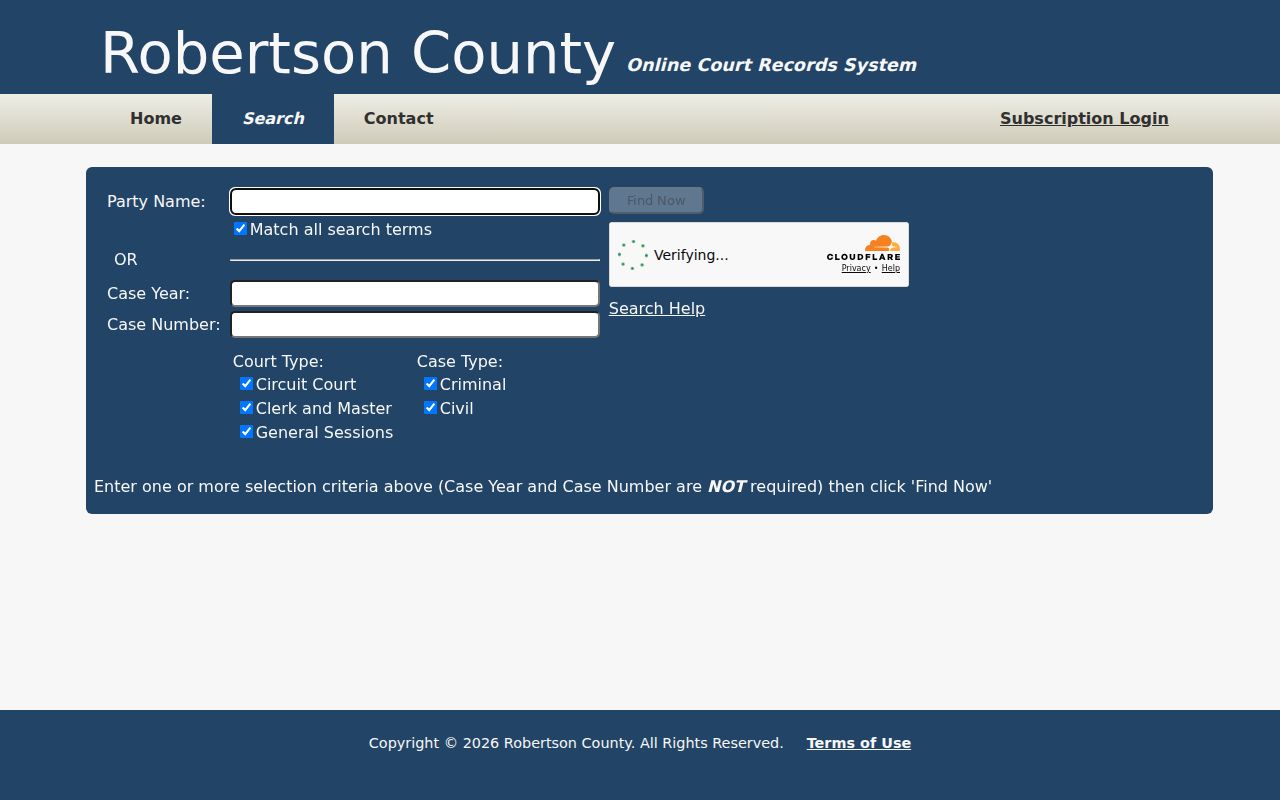
The screen confirms that court type, case type, and the human-verification gate are part of every valid search.
What a Case Search Returns
A Robertson County case search can return identifying and routing fields, parties and attorneys, a chronological case history, settings, disposition or judgment details, and costs where those fields are public. Not every result carries all of it. The county itself warns that the online material is not the complete official court record. It should not be used for legal purposes. When exact legal status matters, check any "closed," "disposed," or "paid" label against the signed order or judgment.
| Case number | The court reference used to distinguish the file. |
|---|---|
| Style or parties | The public caption and roles, subject to redaction. |
| Case type and court | The civil or criminal filter and responsible office. |
| History and settings | Public filings, hearing dates, resets, and orders listed in sequence. |
| Status or disposition | An index label that may need confirmation from the signed record. |
Missing Robertson Case Results
An empty grid does not mean no Robertson County case exists. Usual culprits include the wrong court checkbox or the wrong Civil or Criminal filter. A name variant, a misread filing year, or the full formatted case number can also cause it. The 2,500-row cap can bury a broad name query.
For an older matter, try the Robertson County Archives guest index. Use a partial surname or a known record series. Those Archives indexes are working resources that change over time, generally spanning 1796 through 2021, not a complete modern docket. A city citation belongs with that city court. For a county matter, ask the Circuit Court Clerk, General Sessions Clerk, or Clerk and Master. Those offices can confirm which one holds the record.
Quick answer: Change one search choice at a time and save the terms used. A reproducible query is easier for a clerk to troubleshoot.
Statewide vs County Case Search
Tennessee offers no single public statewide trial-court docket portal. TNCRTInfo searches the participating Robertson County trial offices only. The separate Tennessee Public Case History system covers appellate cases, with Case Overview, Case Milestones, Parties, Case History, and Record Information views. It helps when a county ruling has been appealed. It is not a substitute for the Robertson trial file.
| Tennessee Public Case History | Robertson TNCRTInfo |
|---|---|
| State appellate cases | Robertson Circuit, Clerk and Master, and General Sessions searches |
| Appeal milestones and record information | Local trial-case index and docket activity |
| Best for tracing an appeal | Best for locating a known Robertson trial matter |
Robertson Courts Behind Filters
The portal's checkboxes stand for offices, not the whole Tennessee court hierarchy. Circuit and Criminal Court take major civil and felony matters in the 19th Judicial District. General Sessions handles misdemeanor criminal matters. It also takes county and Tennessee Highway Patrol citations. The civil matters the county describes round out its work. The Clerk and Master keeps the Chancery records. Juvenile and municipal cases follow separate or more limited routes.
- Circuit Court
- General-jurisdiction trial route for major civil matters and related records.
- General Sessions
- Local route for misdemeanors, county traffic, and lower civil matters.
- Clerk and Master
- The office that keeps Robertson County Chancery records.
- City Court
- A municipal docket not included among the observed TNCRTInfo court checkboxes.
Rely on the court printed on the citation, order, or filing. White House and Millersville cross county lines, so the named court is more reliable than the event location alone for any Robertson County docket search.
Access and Restricted Cases
Tennessee Supreme Court Rule 34 opens court records to the public unless a statute, another rule, or a court order says otherwise. The rule also allows reasonable limits. These protect record integrity, the parties’ rights, court deliberation, and sound court operations. Sealed, expunged, adoption, juvenile, and some protective-order material may be hidden, cut to a limited marker, or withheld. Juvenile access runs especially narrow. The state confidentiality framework drives that limit. A missing name does not prove a Robertson County case never existed. Ask the responsible clerk. Is the record public, restricted, sealed, or expunged? Can a redacted docket entry be inspected? A court order controls access, not the behavior of a search screen.
Robertson Clerk Search Fallbacks
Online access is only one channel for Robertson County court records. The Circuit Court Clerk lists 422 West Court Square, Suite 106, Springfield, telephone 615-384-7864, while an official AOC profile also shows a South Main Street office entry. Confirm the room before a visit. General Sessions lists 529 South Brown Street and 615-382-2324. Chancery requests belong with the Clerk and Master at 501 South Main Street, Room 103, telephone 615-354-5650. These routes matter when a public result lacks the filed paper or a certified outcome. For Chancery material, the revised written policy permits in-person, mail, fax, and email requests. It also requires proof of Tennessee citizenship. State the case number, year, record type, date range, and whether inspection, plain copies, or certification is needed. For Circuit and General Sessions, call the responsible clerk before mailing. The linked policy PDFs do not load. Ask whether an office terminal is available. The clerks publish no distinct public-terminal policy. A municipal citation requires its city clerk. Springfield, White House, Greenbrier, Millersville, and Coopertown each publish different access paths. The absence of City Court from TNCRTInfo is a routing limit, not a no-case finding. The county courthouse page lists regular weekday clerk hours. It warns that phones, electronic devices, and watches are barred from courtrooms and the courthouse itself. Carry identification. Confirm the current office before arriving. For an official result, ask for the docket entry, judgment, order, or certified disposition by name. That request is more precise than asking the clerk to explain an online status. Keep the clerk’s response with the saved search terms and date.